
You are using an out of date browser. It may not display this or other websites correctly.
You should upgrade or use an alternative browser.
You should upgrade or use an alternative browser.




- Awards
- 24
[INFORMATION]Some other things to 'try on for size':[/INFORMATION]
[INFORMATION]In recent versions of the forums, we had different choices in how your forum would look---"visual packages," as it were: purple rather than blue, multi-colored formats, even holiday-themed visuals like Halloween and Christmas. The same forum information was presented, just re-arranged somewhat and differing colors/sizes of fonts/etc. The various choices were offered to make the forums more individualized and unique looking. We have added one of the old packages, "Velour" as an option again. Old-timers around here will know what I'm talking about, while newer folks might liken this to a home renovation once they see how it "makes over" a familiar space. If you go to the main forum page and scroll to the very bottom, you will likely see "default" as your "forum style" in the bottom left. Click on that and it should pop up an option to change it to "Velour". As I said, try it on for size. If you don't care for the new look, just scroll back down and re-choose "default".[/INFORMATION]
[INFORMATION]
The moderation team is always on the lookout for new features, things to help enliven the viewing experience. A new "background image" feature was bandied about, and after some digging around we collected some versatile images that can be placed behind the actual forum, framing the forum to give it a bit of a facelift. Don't like our traditional blue? How about red or silver, maybe trees or a lakeside image? The best part in my opinion is that you can try them on quite easily, or just opt to go back to square one without too much effort. To play with the latest toy, click the "picture" icon up in the corner near your "inbox" and "alerts" icons (there's no "background chooser" name next to it, just a small picture icon). If it makes your screen look too "busy," then just hit "reset background" at the bottom of the pop-up and it will return you to your regularly-scheduled screen.
[/INFORMATION]
[SUCCESS]Please keep in mind that I'm not exactly sure when this picture icon will be visible on all member pages, but if you don't see it within 24 hours we will look into it. Have fun exploring.[/SUCCESS]
[INFORMATION]In recent versions of the forums, we had different choices in how your forum would look---"visual packages," as it were: purple rather than blue, multi-colored formats, even holiday-themed visuals like Halloween and Christmas. The same forum information was presented, just re-arranged somewhat and differing colors/sizes of fonts/etc. The various choices were offered to make the forums more individualized and unique looking. We have added one of the old packages, "Velour" as an option again. Old-timers around here will know what I'm talking about, while newer folks might liken this to a home renovation once they see how it "makes over" a familiar space. If you go to the main forum page and scroll to the very bottom, you will likely see "default" as your "forum style" in the bottom left. Click on that and it should pop up an option to change it to "Velour". As I said, try it on for size. If you don't care for the new look, just scroll back down and re-choose "default".[/INFORMATION]
[INFORMATION]
The moderation team is always on the lookout for new features, things to help enliven the viewing experience. A new "background image" feature was bandied about, and after some digging around we collected some versatile images that can be placed behind the actual forum, framing the forum to give it a bit of a facelift. Don't like our traditional blue? How about red or silver, maybe trees or a lakeside image? The best part in my opinion is that you can try them on quite easily, or just opt to go back to square one without too much effort. To play with the latest toy, click the "picture" icon up in the corner near your "inbox" and "alerts" icons (there's no "background chooser" name next to it, just a small picture icon). If it makes your screen look too "busy," then just hit "reset background" at the bottom of the pop-up and it will return you to your regularly-scheduled screen.
[/INFORMATION]
[SUCCESS]Please keep in mind that I'm not exactly sure when this picture icon will be visible on all member pages, but if you don't see it within 24 hours we will look into it. Have fun exploring.[/SUCCESS]



- Awards
- 5
I really LOVED that halloween style the (old) forum had some years ago, it had a background picture with a hag house and pumpkins and everything was quite dark and greyish... i used that style for ages until the forum crashed and all was gone.


- Awards
- 32
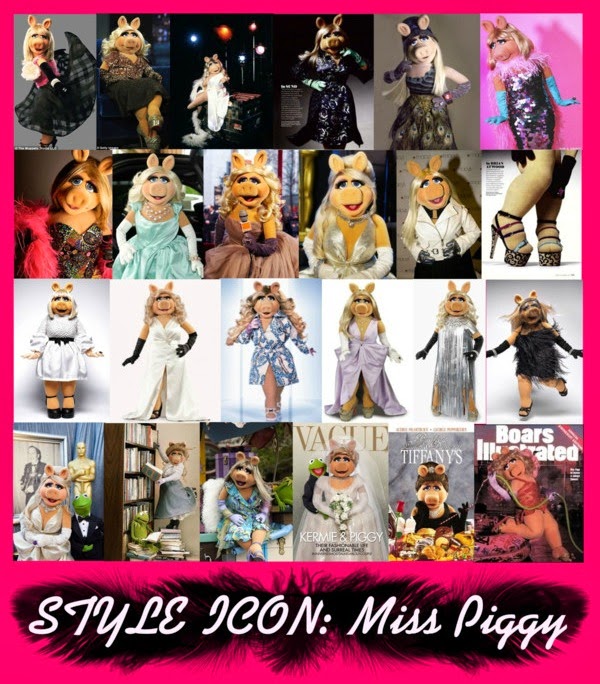
Try it out - it probably needs tweaking though because it's looking rather stretched and I don't know if Miss P. would approve.Moi wants to know if there is some way to set this fantabulous collage as the site background!
There's nothing really Halloween about the new dark one, but it's a start...I really LOVED that halloween style the (old) forum had some years ago,
Send you chocolate cakes as thank you!

- Awards
- 24
Try it out - it probably needs tweaking though because it's looking rather stretched and I don't know if Miss P. would approve.
Is that like "twerking"? Because la Piggy can do that if intoxicated enough...

- Awards
- 25
Coffee? Tea? The death penalty?
How quickly and drastically things can change over at the poll questions section!
How quickly and drastically things can change over at the poll questions section!
Last edited:


- Awards
- 8
Dunno. It all blurs into one for me.Coffee? Tea? The death penalty?
How quickly and drastically things can change over at the poll questions section!

- Awards
- 27
Yeah,...I wonder what BF has in mind, but I think I'm going to decline the invitation. Let me know how it was (....if you canCoffee? Tea? The death penalty?
).
- Awards
- 39
Yeah,...I wonder what BF has in mind, but I think I'm going to decline the invitation. Let me know how it was (....if you can
It has nothing to do with me!!!!!!!!!!!!!!!!!!!!!!!!!!!!!!! Just Tea or coffee (or in my case neither really)
- Awards
- 27
Eh...lemonade, then? Perhaps? Maybe? If you like...


- Awards
- 5
Hello All,
I am using the Default Dark Theme thanks,
and was wondering if the Admin could adjust the .css for a section that needs colour tweeking.
To see this, is to select Default Dark Theme,
then Forum/.../Search Forums
you will then see these buttons
Those Buttons are grey on grey, and need to be either,
White on Grey or Black in Grey.
Thanks in Advance. Dave I
I am using the Default Dark Theme thanks,
and was wondering if the Admin could adjust the .css for a section that needs colour tweeking.
To see this, is to select Default Dark Theme,
then Forum/.../Search Forums
you will then see these buttons
Those Buttons are grey on grey, and need to be either,
White on Grey or Black in Grey.
Thanks in Advance. Dave I

A
Anonymous
Guest
what happens if i click that "Anonymous?" checkbox before posting?
- Awards
- 5
Oh, i see. I get an hilarious avatar and can post as a guest. Well, that's ... hilarious.
Last edited:
A
Anonymous
Guest
I can't believe Matthew Blaisdel posted that message just to see how it's like to be anonymous!
I find it rather disrespectful towards real anonymous people like me.
I find it rather disrespectful towards real anonymous people like me.
A
Anonymous
Guest
The avatar is more disrespectful to alien life form like myself.
A
Anonymous
Guest
^
How rude, the avatar looks exactly like the real me. I think I'm going to unfollow you!
How rude, the avatar looks exactly like the real me. I think I'm going to unfollow you!

- Awards
- 32
I forgot about this style.I am using the Default Dark Theme thanks,
I'll look into changing those colours that clash, probably at the weekend.